.png?width=250&height=45&name=Refreshed%20Logo%20Blue%20(HQ).png)
Many UK and European external sirens, also called sounders or bell boxes, need a constant 12V supply plus a separate trigger wire. Some also have a separate strobe trigger, a tamper or hold-off connection, and an internal backup battery.
The Alarm Panel Pro is designed for the common negative-switched pattern:
- 12V+ and AUX- provide constant power.
- ALRM1- and ALRM2- pull to ground (AUX-) when active.
A self-powered bell box can sound when its 12V supply or tamper connection is removed. Do not begin by disconnecting wires from the old panel. Photograph and label every connection, identify the exact sounder model, and follow its engineer or maintenance hold-off procedure. If you cannot identify the model or safely reach the sounder, contact an alarm installer.
Before you connect the siren
- Find the sounder's installation manual. Terminal letters such as A, B, C, and D are not standardized between manufacturers.
- Identify the function of each wire from the old panel terminal, not by wire color. You need to find the permanent positive supply, permanent 0V supply, sounder trigger, optional strobe trigger, and optional tamper or hold-off return.
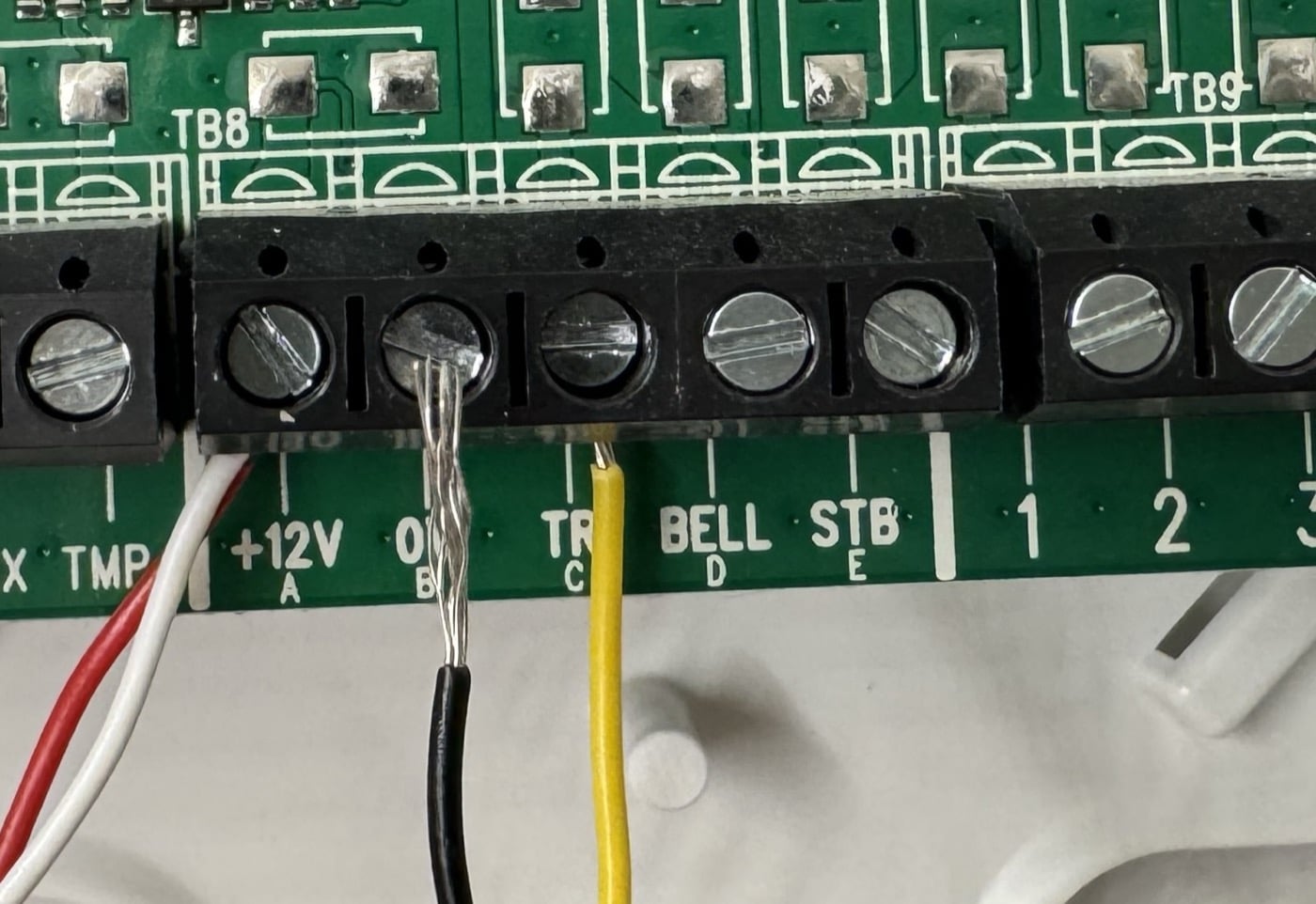
Example labels on a legacy panel. Record the terminal function before moving each wire; wire colours are installation-specific.
- Check the sounder's standby and alarm current in its manual. Each ALRM output on the Alarm Panel Pro is rated for up to 2A. The siren output on the older 6-zone Alarm Panel is rated for up to 1.5A.
- Keep the sounder's internal battery connected or disconnected only as directed by its manual. A constant 12V connection from Konnected supplies the bell box, but battery charging and hold-off behavior depend on the sounder design.
Never connect an ALRM1- or ALRM2- terminal to a positive supply. These are switched-negative outputs.
Basic negative-trigger wiring
For a sounder whose manual calls for a permanent 12V supply and negative-applied triggers:
- Connect the sounder's permanent positive supply to 12V+.
- Connect its permanent negative or 0V supply to AUX-.
- Connect its negative sounder trigger to ALRM1-.
- If you want separate sounder and strobe control, connect the negative strobe trigger to ALRM2-. If they should always operate together, connect both trigger wires to the same ALRM terminal.
- Connect a tamper or hold-off return to AUX- only when the sounder manual calls for a maintained 0V or negative connection. This keeps the required 0V reference, but it does not give Konnected tamper detection.
- Configure the connected ALRM output as a switch or siren output, then test the sounder and strobe before relying on an alarm automation.
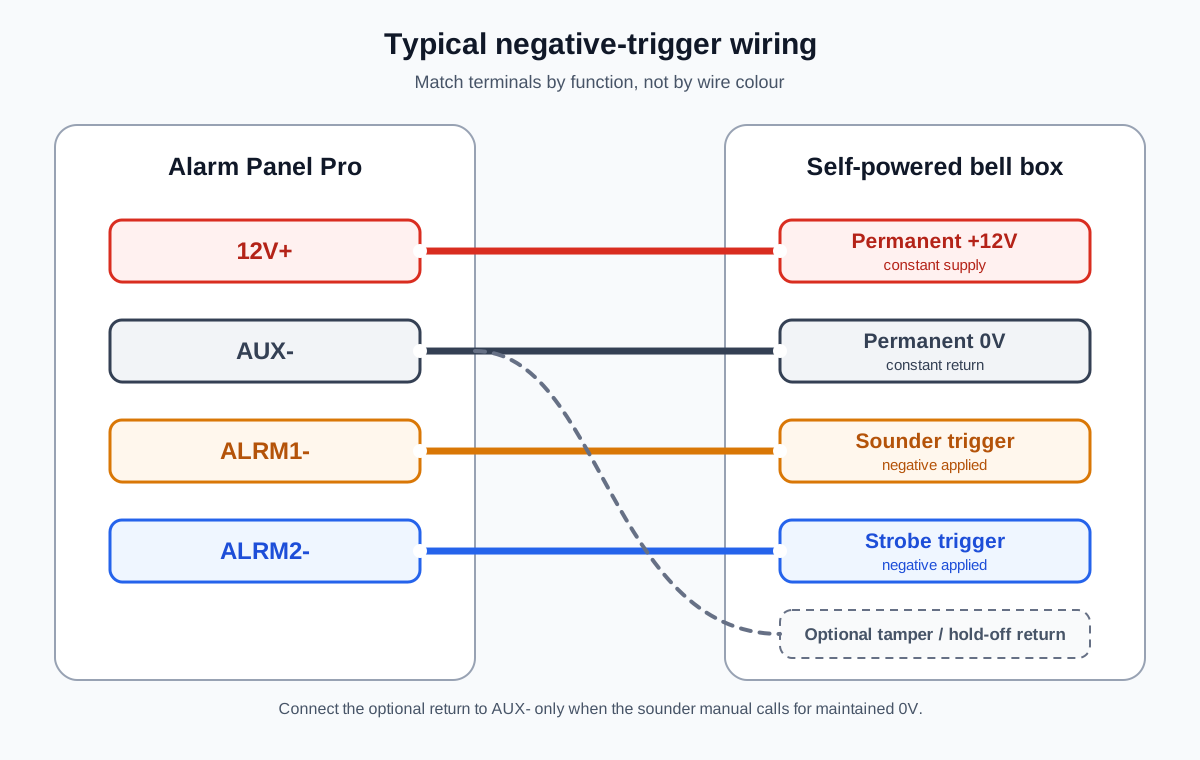
Typical Alarm Panel Pro wiring for a negative-trigger self-powered sounder. Match terminals by function, not by wire colour.
The older 6-zone Alarm Panel has one switched siren output. On that board, connect the permanent positive supply to ALARM/AUX+, permanent 0V to AUX-, and the negative trigger to ALARM-.
Konnected does not separately detect tamper or wiring faults. If tamper detection is required, read Tamper detection and End-of-Line (EOL) Resistors.
Texecom Premier Elite Odyssey sounders
This terminal pattern is used by the Texecom Odyssey family, including Odyssey 3E and Premier Elite Odyssey 5E models:
- A (12V): Connect to 12V+.
- B (BELL): Connect to ALRM1-.
- C (TAMP): Connect to AUX- when a maintained negative hold-off return is required.
- D (0V): Connect to AUX-.
- S (STRB): Connect to ALRM2-, or to ALRM1- if the strobe should always follow the sounder.
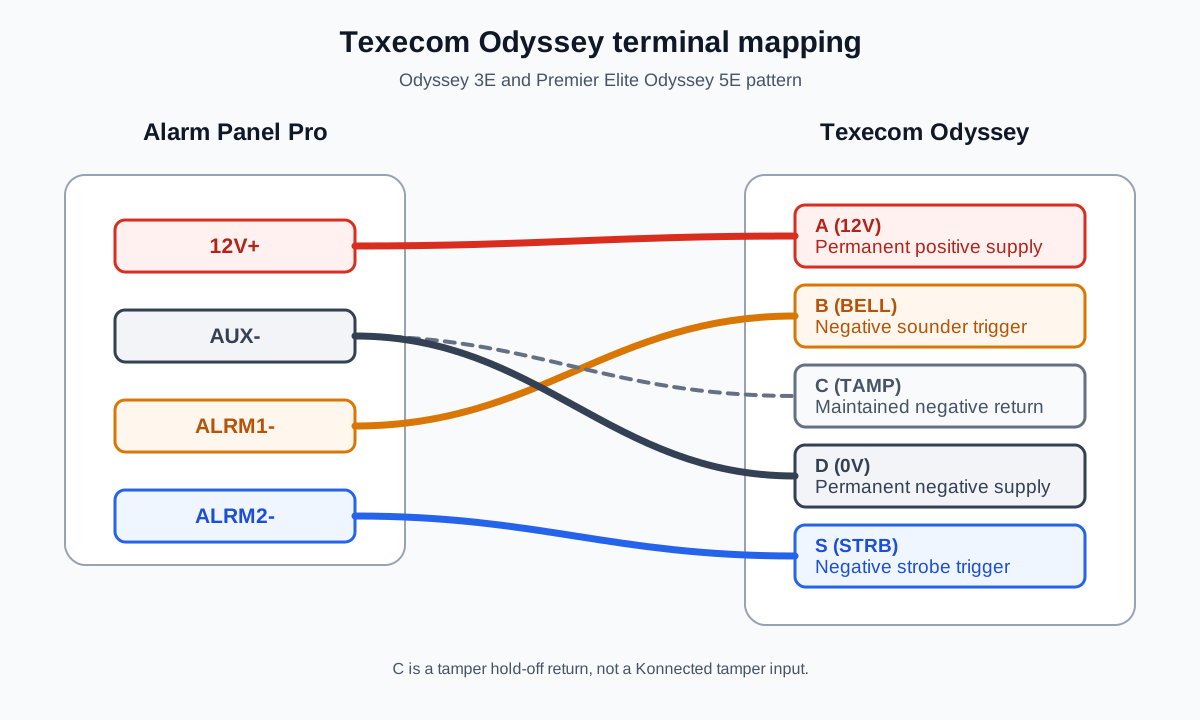
Texecom Odyssey A/B/C/D/S terminal mapping. The C terminal is a tamper hold-off return, not a Konnected tamper input.
Some older Scantronic panels label the same functions +12V, BELL, TR, 0V, and STR. Transfer each wire by function using the mapping above.
Put a Texecom Odyssey into Engineer Hold-Off mode
Texecom documents this procedure for servicing an Odyssey without triggering its self-activate function:
- Activate and deactivate the strobe three times within 30 seconds.
- Confirm that only the right LED is flashing. This indicates that Engineer Hold-Off mode is active while the tamper circuit is secure.
- Allow at least three minutes after the last strobe flash before opening the cover.
- Open the tamper circuit within 15 minutes. If you do not, Hold-Off mode begins to cancel, followed by a two-minute warning period.
When the cover is replaced and the tamper circuit closes, the LEDs flash rapidly for two minutes before normal self-activate behavior returns.
This hold-off sequence is specific to the Texecom Odyssey manual. Do not assume another make or model uses the same procedure.
ADE and Honeywell Accenta, Optima, Reson8, and Sonade wiring
Accenta and Optima panels commonly use T/A/D/B bell-box terminals. Reson8 sounders use the same markings, and some Sonade diagrams add separate strobe terminals:
- D (12V positive supply): Connect to 12V+.
- A (0V supply): Connect to AUX-.
- B (negative sounder trigger): Connect to ALRM1-.
- T (negative tamper return): Connect to AUX- when a maintained negative return is required.
- STROBE+, when present: Connect to 12V+.
- STROBE-, when present: Connect to ALRM2-, or to ALRM1- if it should follow the sounder.
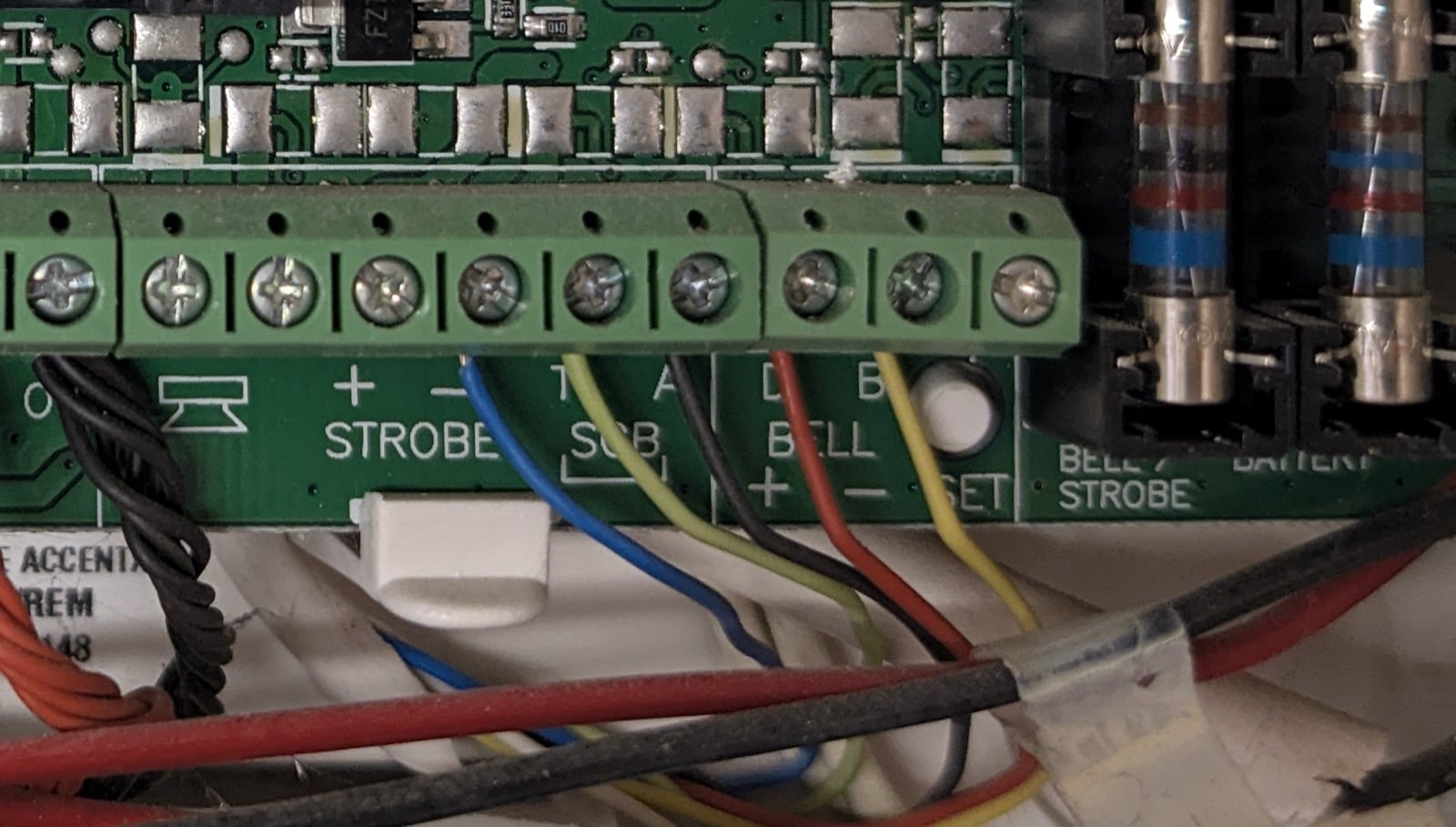
A Honeywell Accenta panel showing the T/A/D/B bell-box labels. Match the printed functions, not the wire colours.
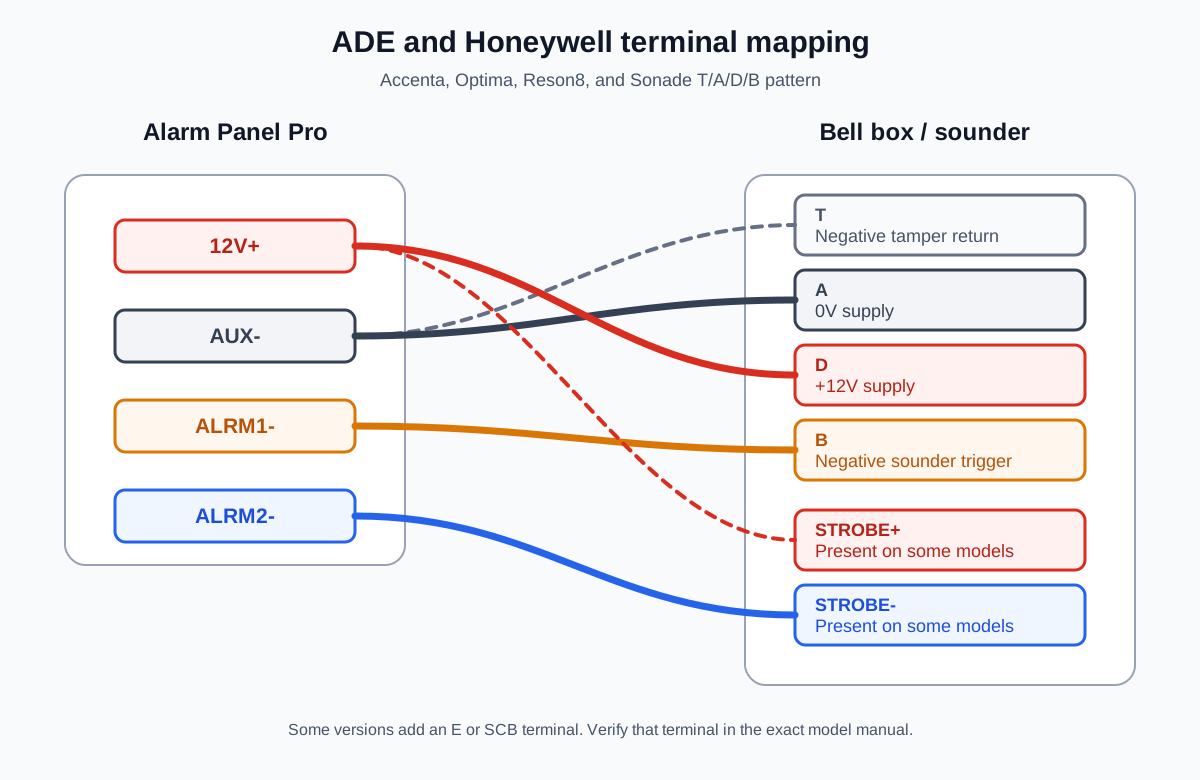
ADE and Honeywell T/A/D/B terminal mapping. Separate strobe terminals are present only on some models.
Some versions add an E or SCB terminal. That terminal is not standardized. Follow the exact sounder manual instead of guessing from the letter.
Sounders labeled H/O, TR, STB, and TRG
For the six-wire pattern H/O+, H/O-, TR-, STB-, and TRG-:
- H/O+: Connect to 12V+.
- H/O-: Connect to AUX-.
- TR-: Connect to AUX-.
- TRG-: Connect to ALRM1-.
- STB-: Connect to ALRM2-, or to ALRM1- if the strobe should follow the sounder.
If the sounder also has an SPK+ terminal, verify it in the manufacturer manual before connecting it. The label has not been consistent across the examples submitted to support.
Sounders labeled ST-, S-, +, -S, and -R
For this terminal pattern:
- + Sounder: Connect to 12V+.
- -S and -R: Connect to AUX-.
- S-: Connect to ALRM1-.
- ST-: Connect to ALRM2-, or to ALRM1- if the strobe should follow the sounder.
Elkron HP201, HP202L, and HP202LG
These models do not use the simple one-trigger pattern above. Their manual shows separate BL1 and TC1 lock inputs, selectable positive or negative input reference, and model-specific jumper settings. Do not use one of the generic terminal patterns for these sounders. Contact support with a photo of the current wiring and the JP5 jumper before connecting it to Konnected.
If the siren sounds during changeover
Keep the old panel connected until you have identified the permanent supply and hold-off connections. Some bell boxes can remain quiet during a panel change when their manufacturer-approved hold-off supply is maintained by a separate 12V source. There is no universal wiring sequence for doing this safely.
If the sounder starts and you do not know its service procedure, do not continue moving wires as a test. Restore the documented original connections or contact an alarm installer who can access the sounder and isolate its internal battery safely.
For standard two-wire sirens without an internal battery, use Wiring Your Siren.